
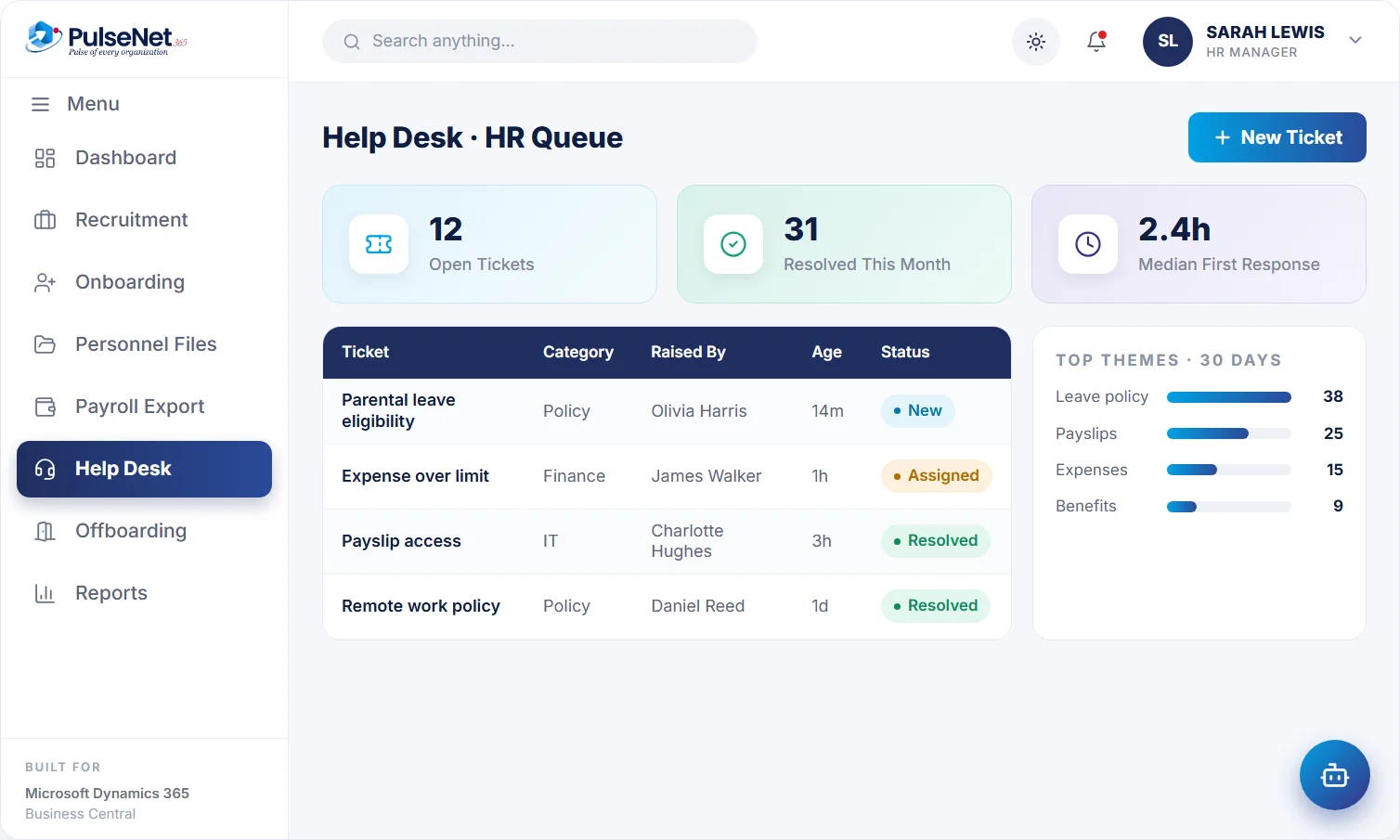
HR and IT requests become tracked tickets with an owner, a category and a history. The AI assistant answers routine policy questions before a ticket is ever raised.
policy question
to HR operations
median 2.4 h
Every HR team knows the pattern. How many days can I carry over? Where is the parental leave policy? Who do I tell about a new address? The questions arrive by email, chat and in the corridor, each takes two minutes to answer, and together they take the afternoon. Meanwhile the questions that need real judgement wait in the same pile as the easy ones.
Without a single route, nobody can see what was asked, who answered or whether the answer helped. When the person who knows leaves, the knowledge leaves with them, and the same questions start again from scratch, answered slightly differently each time.
Most policy questions are answered instantly.
Anything else becomes a tracked request.
The right team picks it up.
Themes show where policies need work.
Routine questions are answered straight away. Everything else becomes a ticket with an owner, a category and a status, so nothing waits in a private inbox.
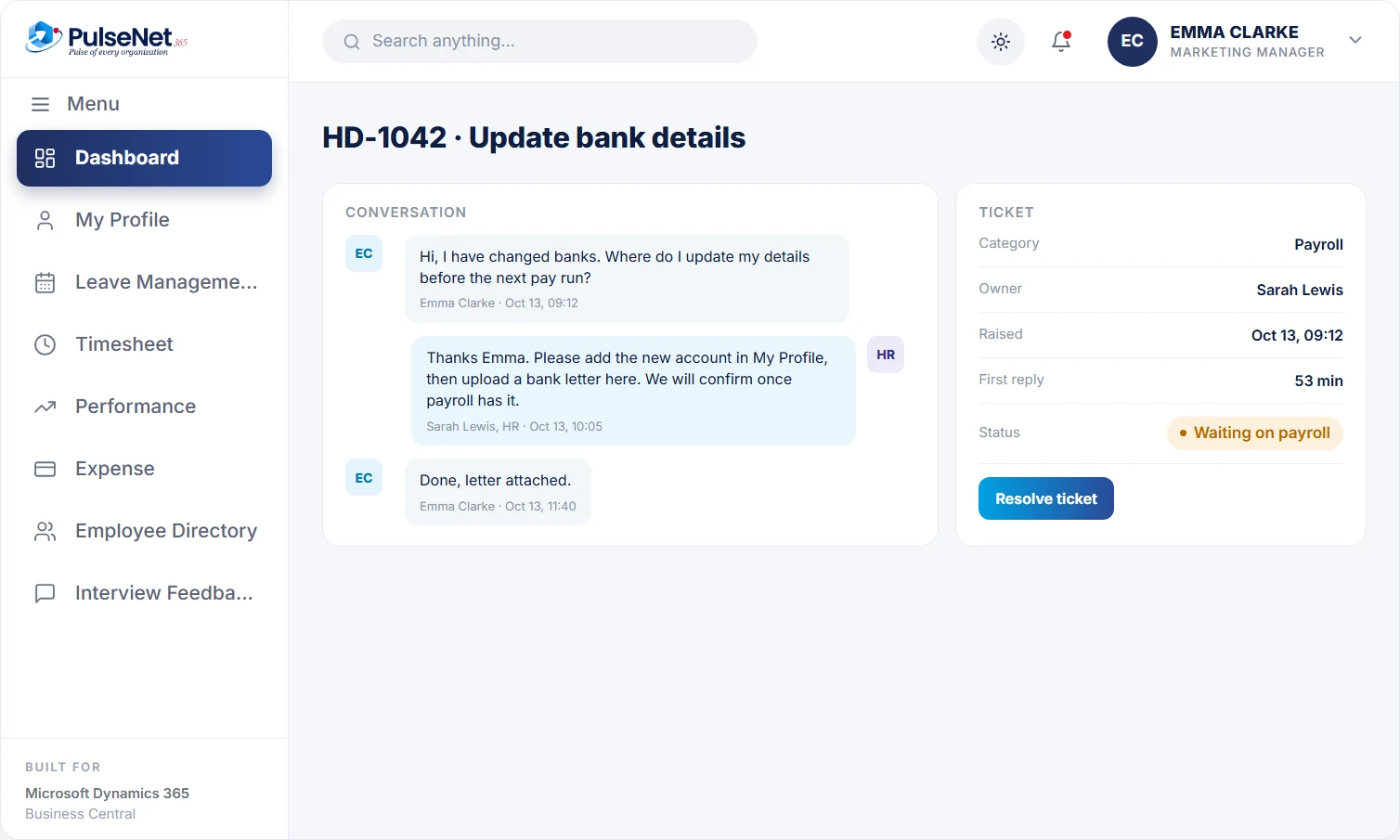
An employee asks the AI assistant a question at any hour. If the answer is in HR's policies, such as how carry-over works or what counts as a client meal, they get it straight away. If the assistant cannot answer, or the topic needs a person, the question becomes a Help Desk ticket instead of a guess.
Each ticket has a category, such as leave, pay query, IT access or documents, and a named owner. HR and IT share one route for employees, so a laptop problem and a request for an employment letter both start in the same place and reach the right team. Employees see the status without having to ask.
Tickets move from new to resolved with a history of what happened along the way. HR sees everything open, who owns it and how long it has waited, rather than hunting through inboxes. When an owner is away, the queue is still visible, so a colleague can see what is waiting and nothing sits unanswered.
Theme reporting shows which categories come up most. If carry-over questions spike every November, the policy wording or the reminder is the problem, not the employees. Fix the source, update the policy the assistant answers from, and the same question stops arriving next year. A short monthly look at the top categories is usually enough to find the next fix.
One place to ask, at any hour, with an instant answer for routine questions and a tracked ticket for everything else. They can see where a request has got to, which removes the follow-up email that usually doubles the work for everyone involved.
Every open question in one queue, with an owner, category and age. Routine questions shrink because the assistant answers them, leaving HR time for the grievance, the health issue or the pay query that genuinely needs a person and a careful reply.
Access and equipment requests arrive through the same route as HR questions, categorised and assigned, instead of as a message to whoever the employee happens to know in IT. The queue shows what is open and for how long, which helps when planning cover.
Fewer questions routed through them simply because they do not know the answer, and a clear place to send team members instead. When one team raises many questions on the same topic, a short briefing for that manager often helps more than any tool.
Business Central does not include an HR help desk. It holds the employee records, the permission sets that control access and, with a Copilot-enabled licence, Copilot chat and list analysis that can summarise a list in plain language. PulseNet365 adds the ticket itself: one route for HR and IT questions, with categories, owners and status, alongside an assistant that answers routine questions before a ticket is needed.
Whenever HR answers a question likely to come again, put the answer back into the policy content in plain language. 'You can carry over up to five days, used by the end of March' helps more than a quoted clause. The next person, and the assistant, then have it.
Grievances, health matters and whistleblowing should not sit in a general queue. Use a separate route with tighter access, and tell employees it exists before they need it. People raise sensitive issues only when they trust who will read them.
Volume tells you how busy HR is. Time to first response and the number of reopened tickets tell you whether the desk works. Review both monthly, with the top five categories, and pick one policy to rewrite each month.
Routine HR policy questions, answered from your organisation’s own policies: carry-over rules, expense limits, notice periods, who to contact for what. It can also act on the task behind the question, such as applying for leave in a chat. Anything outside written policy, or anything sensitive, becomes a Help Desk ticket for a person.
Access is role-based, so the owner and the people whose role allows it see a ticket, not the whole organisation. For grievances and health matters, agree during configuration how those categories are restricted, and explain to employees how it works before they need it.
Which categories and topics come up most, over time. Use it to find policies that are unclear, processes that confuse people and teams that need a briefing. A spike in expense questions after a policy change usually means the change was not explained well, not that employees ignored it.
No. It answers questions and starts requests, such as a leave application or an expense claim, which then go to the manager and HR for approval as normal. Tickets are resolved by people. See AI for HR for where the assistant stops.
Start with your ten most common questions and check that the policy behind each is current and plainly written, because the assistant answers from it. Then announce one route for everything else, and stop answering routine questions by private email, politely, with a pointer to the desk.
Every module shares the same employee record on Business Central, so adding another one adds no integration work.
Everything employees and managers need.
One 360° record per employee.
Instant balances, 1-click approvals.
Bring your Business Central setup and the process that costs you the most time. We will show you Help Desk on the platform you already run.
Tell us where to send the invite. We’ll show it with your processes in mind.