
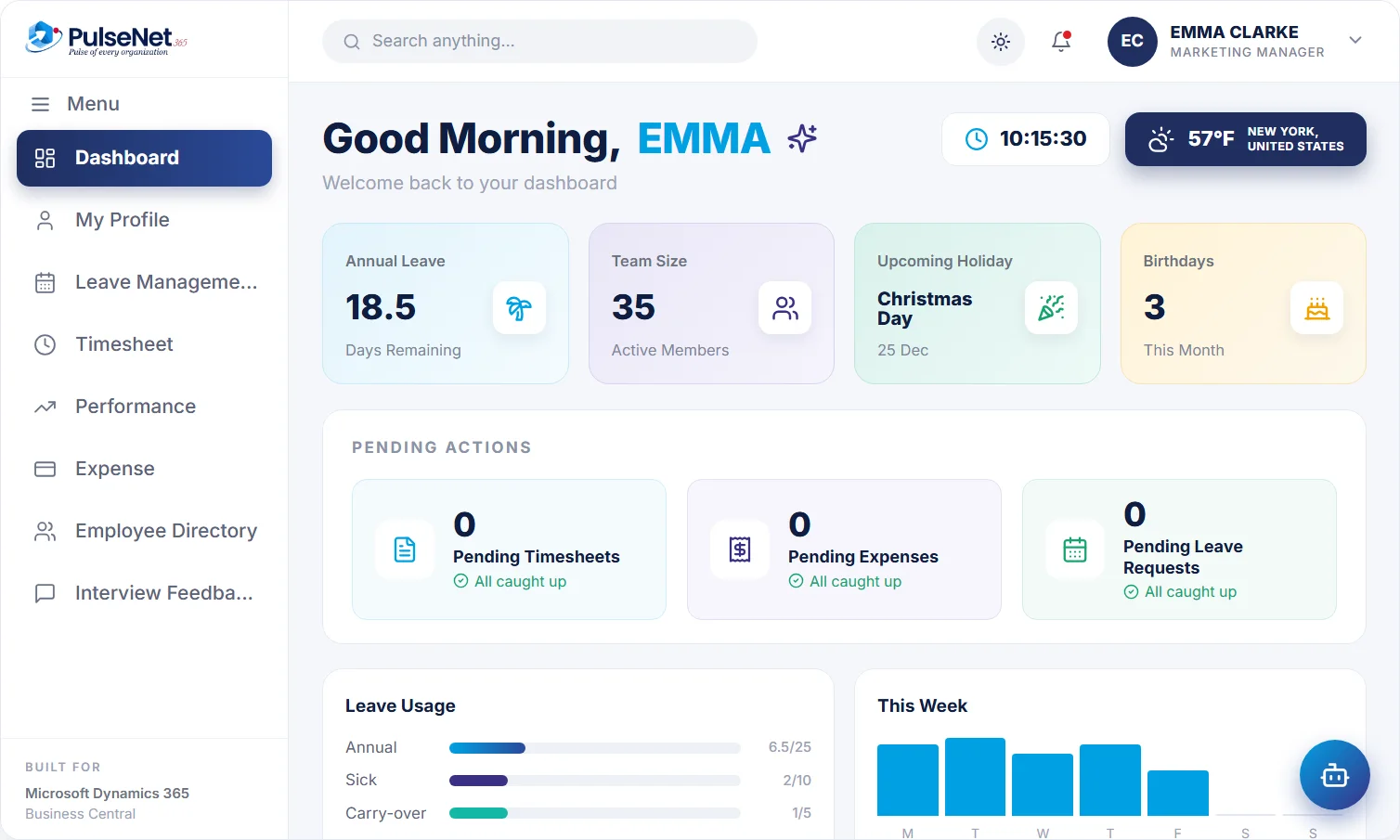
Leave balance, team, upcoming holidays and anything waiting on them: timesheets, expenses and leave requests. Plus an AI assistant employees can ask, 24/7.
in 2 seconds
live
all caught up
Plenty of organisations launch an HR portal, announce it with enthusiasm and watch the HR inbox stay exactly as full. Employees arrive with one small job, such as checking a balance or submitting hours, and compare the portal with the alternative: emailing someone. If the portal is slower, harder to find or shows a number they do not trust, they go back to email and rarely try again.
Trust is the part that gets overlooked. When the balance on screen does not match what HR says, employees learn to double-check by email, and HR answers the same question twice. Self-service only reduces work when the data behind it is right.
One dashboard, on web and mobile.
Every open action in one list.
Apply, submit or claim in seconds.
The AI assistant answers HR questions 24/7.
Self-service earns its place by being quicker and more reliable than asking a person. These are the everyday jobs it handles.
The dashboard shows the leave balance, upcoming holidays, birthdays and anything waiting on the employee: a timesheet to submit, an expense to finish, a leave request awaiting a decision. Sarah Lewis signs in on Monday and sees her timesheet is due, her leave for next month is approved and a public holiday falls on Thursday.
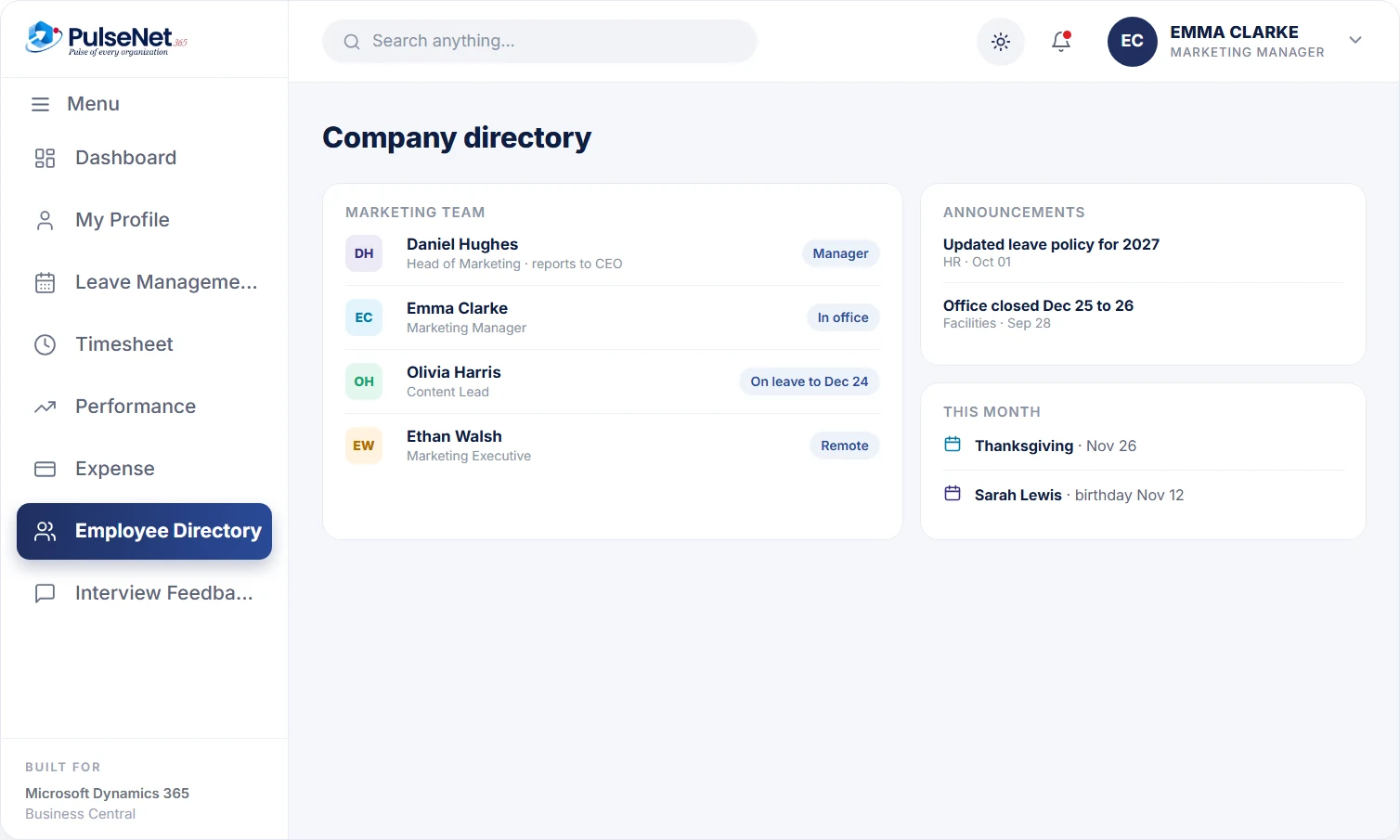
The company directory and organisation hierarchy come from the same employee records HR maintains, so they change when the record changes, not when someone remembers to update a separate list. People find a colleague, their role and their manager without asking HR, which matters most for new starters in their first weeks. Announcements sit on the same dashboard, where people already look.
Employees see their own profile and keep their own details up to date, such as address, phone number and emergency contacts. The record stays accurate without HR chasing it, and the same record feeds leave, time and payroll data, so a correction made once is correct everywhere that uses it. Nobody retypes a new address into three systems.
Employees can ask the AI assistant, 24/7, in plain language: apply for leave in a chat, photograph a receipt to file a claim, or ask a policy question. Anything it cannot answer becomes a Help Desk ticket. Managers and HR still approve every request it creates, exactly as they would a form submitted by hand.
Their balance, holidays and pending actions in one place, on web and mobile. They apply for leave, submit timesheets, claim expenses and look up a colleague without emailing HR, and see the status of every request instead of wondering whether it arrived.
Leave, timesheets and expenses from the team waiting in one place, each with the context needed to decide, such as the balance and team overlap on a leave request. Approvals stop depending on which inbox or chat thread a request happened to land in.
Fewer routine questions and requests, and a record that stays current because employees maintain their own details. HR time moves from answering 'how many days do I have left' to the cases that genuinely need judgement, context and a proper conversation.
One place employees go for HR tasks, hosted on Microsoft Azure with private cloud hosting exclusive to your organisation, and role-based access deciding who sees what. Extra needs can be met with Power Apps or Power Automate rather than another standalone portal to support.
Business Central is built for people who work in it every day: finance, operations and HR administrators. Its Role Centres give each user a home page for their own work. Most employees, though, need a handful of HR tasks and should never see a ledger. PulseNet365 Self-Service gives them a simple dashboard for those tasks, reading from and writing to the same employee records Business Central already holds.
One wrong leave balance on day one does more damage than any missing feature. Before go-live, reconcile every opening balance against your current records, confirm each person's manager, and ask a handful of employees to check their own profile first.
Self-service moves work towards approvals. Show managers where requests arrive, what to check and how quickly you expect a decision, and agree who covers approvals during their leave. A manager who ignores requests becomes the new bottleneck within a week.
Start with the tasks people do most: leave, timesheets, expenses and questions. A portal with forty menu items looks thorough and feels confusing. Add more once the habit exists, and watch the HR inbox: routine questions should arrive less often.
Yes. The dashboard works on web and mobile, which matters for people who are rarely at a desk, such as field, site or warehouse staff. They can check a balance, apply for leave, submit a timesheet or photograph a receipt from wherever they happen to be.
No. The assistant creates requests and answers questions. A leave request made in chat goes to the manager exactly as one made through the form, and a claim filed from a receipt photo goes to the approver. Managers and HR make every decision. See AI for HR for where the assistant stops.
It reads from the employee records HR maintains, the same records used for leave, time and payroll data. When someone joins, changes team or leaves, updating the record updates what people see. There is no separate list to keep in step, which is the usual reason portal directories drift.
Employees ask the AI assistant. Routine policy questions get an instant answer from HR’s own policies, and anything else becomes a Help Desk ticket with an owner, so it reaches HR with a record instead of disappearing into an inbox.
Watch three things in the first months: fewer routine questions in the HR inbox, timesheets and claims arriving on time with fewer corrections, and managers’ pending lists staying short. Then ask a few employees whether it is quicker than emailing HR. Our article on leave without spreadsheets covers the first task most teams move.
Every module shares the same employee record on Business Central, so adding another one adds no integration work.
Instant balances, 1-click approvals.
Tickets tracked to resolution.
One 360° record per employee.
Bring your Business Central setup and the process that costs you the most time. We will show you Self-Service on the platform you already run.
Tell us where to send the invite. We’ll show it with your processes in mind.