
Employees see their balances and apply in seconds. Requests route to the right manager automatically, with team leave and the organisation calendar in view.
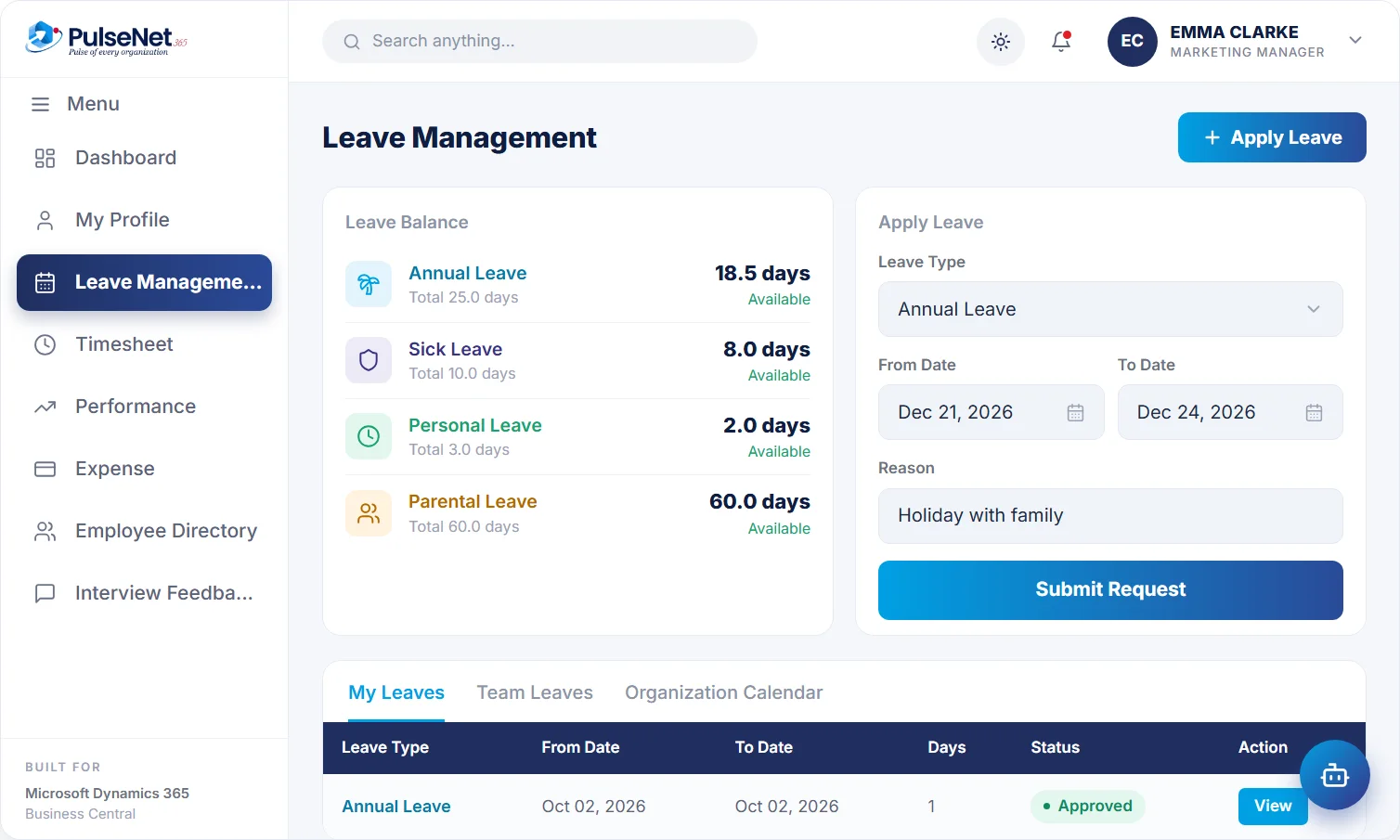
Dec 21–24
updated instantly
checked at approval
Leave looks simple until you count the rules. Annual leave accrues monthly for some staff and is granted up front for others. Carry-over is capped, except for people returning from parental leave. Part-timers are pro-rated. Each rule lives in someone’s head or a spreadsheet formula, so every balance question becomes an email to HR, and every answer depends on who happens to reply.
Managers approve blind. They cannot see who else is off that week, so two people from a five-person team end up away at once. Then payroll hears about unpaid leave after the cut-off, and the correction lands in the following month’s pay.
Leave type, dates and reason in one short form.
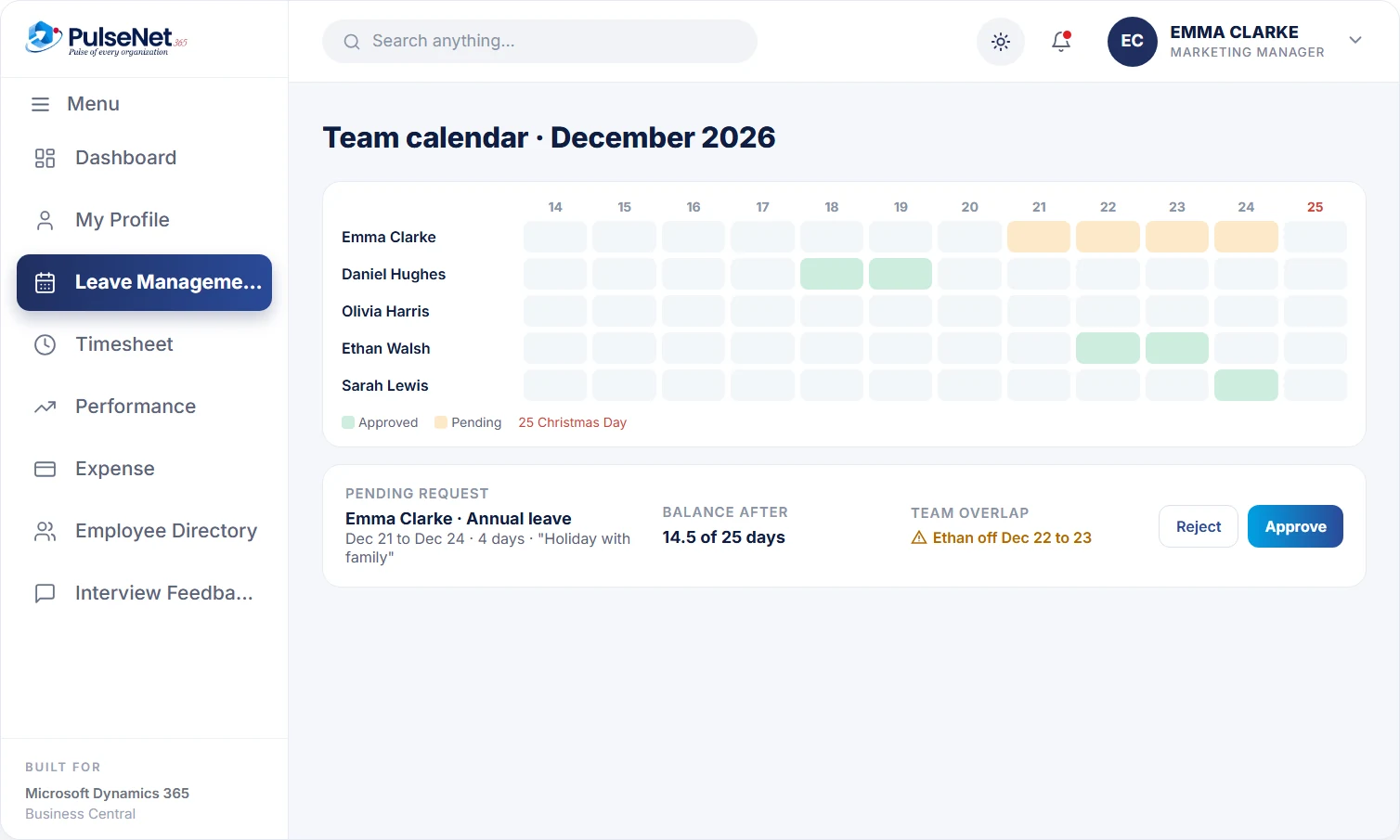
With the team calendar and balance in view.
Everyone sees the same number, instantly.
Approved absence is ready for payroll.
HR encodes the policy, employees apply against it, managers decide with the facts in front of them, and the balance and timesheet update themselves.
HR defines each leave type, such as annual, sick, casual or earned leave, with its own accrual, carry-over, encashment and eligibility rules. Types are assigned to employee groups by department, role or seniority, so a new policy for one group does not mean editing individual balances. Each rule is applied the same way for everyone it covers.
Employees choose a leave type, dates and a reason in Self-Service, or simply ask the AI assistant in plain language. The assistant checks the balance before the request goes in, so people do not book leave they do not have. Either way, the request routes to the right manager for a decision, with the reason attached.
The manager sees the employee's balance and who else in the team is off over the same dates before approving, or rejecting with a remark. That is the information managers used to ask for by email, and without it approvals are either slow or careless. A rejection carries its reason, so the employee knows what to change.
When leave is approved, PulseNet365 creates the matching timesheet entry and updates the balance straight away. The employee sees the new balance, the timesheet already shows the absence, and approved leave is ready for payroll integration. Nobody reconciles the leave calendar against timesheets at month end, because the two records were never allowed to disagree in the first place.
See a balance for every leave type they are entitled to, apply in a short form or by asking the assistant, and get a decision with a reason. Upcoming holidays are on their dashboard, so people can plan around them before booking.
Approve or reject with the balance and team overlap in view, and add a remark when the answer is no. Upcoming absence for the team is visible in one place, which makes rota planning and the summer holiday season far easier than a shared calendar.
Sets leave types and rules once, assigns them by employee group, and stops answering balance questions by email. Year-end carry-over and encashment follow rules already written down, which means fewer exceptions to argue over and a clear record when an employee disputes a balance.
Receives approved absence as part of the payroll-ready data prepared for the provider. Because approval updates the timesheet too, hours and absence already agree before the period closes, rather than being matched line by line after the payroll cut-off has passed.
Business Central includes absence registration: HR records that an employee was absent, against a cause of absence such as holiday or sickness, and can review absence by cause over a period. It records what happened. It does not hold entitlement rules, calculate balances, take requests from employees or route them for approval. PulseNet365 adds that layer on the same employee record, and because approved leave also creates a timesheet entry, leave and time data agree without anyone reconciling them afterwards.
Most leave disputes come from cases the policy never mentioned: joining mid-year, moving from part-time to full-time, leave that spans a public holiday. Decide each one in writing before you configure anything. A rule you can explain in one sentence is a rule a system can apply.
Decide who approves when a manager is away, and make arranging cover part of booking the manager's own leave. Requests routed to someone who is on holiday are a common reason leave approvals sit untouched for a week.
If unused leave is capped or lost at year end, tell people in the autumn, not in December, and show each employee their balance against the cap. Early notice spreads leave across the year instead of emptying the office in the final fortnight.
Yes. Each leave type has its own accrual, carry-over, encashment and eligibility rules, and types are assigned to employee groups by department, role or seniority. A different entitlement for the warehouse, or extra days after long service, is set up as a rule rather than adjusted by hand each year.
The request, with leave type, dates and reason, the employee’s current balance for that leave type, and any overlap with teammates who are already off on those dates. The manager approves or rejects with a remark and the employee is told the outcome. The decision stays on the employee record.
PulseNet365 creates the matching timesheet entry automatically and updates the leave balance at the same time. The employee does not record the absence twice, and a timesheet can no longer show a full working day when the person was on approved holiday. See Time and Attendance for how approved hours are handled.
Yes. An employee can ask for time off in plain language, for example next Friday, and the assistant creates the request after checking the balance. The request then goes to the manager like any other. The assistant never approves leave; managers and HR do. See AI for HR.
No. PulseNet365 prepares approved leave, together with approved hours and expenses, for your payroll provider through payroll integration. Your payroll provider calculates pay, including holiday pay and any deduction for unpaid leave, and remains responsible for filing payroll taxes on your behalf.
Every module shares the same employee record on Business Central, so adding another one adds no integration work.
Track hours, shifts and overtime.
Everything employees and managers need.
Payroll-ready data, no re-keying.
Bring your Business Central setup and the process that costs you the most time. We will show you Leave & Absence on the platform you already run.
Tell us where to send the invite. We’ll show it with your processes in mind.